Bab 1 — Coming Soon
Tips for Bab 1 haven't been added yet. Check back later!
Bab 2 — Coming Soon
Tips for Bab 2 haven't been added yet. Check back later!
Finding the Maximum Value
Proses Mencari Nilai Maksimum (Rajah 3.1.28)
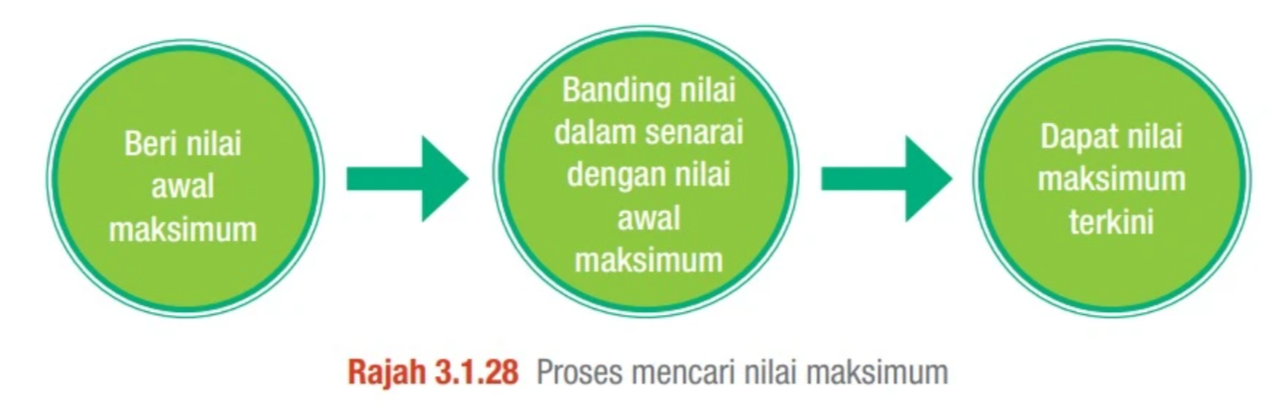
This diagram outlines the logical sequence for finding the maximum value within a collection of items (such as an array):
- Beri nilai awal maksimum (Initialize Max Value): Assign the first element of the array or a very small default number as the initial maximum.
- Banding nilai dalam senarai (Compare with current items): Loop through the remaining elements and compare each item against the current maximum value.
- Dapat nilai maksimum terkini (Update new maximum): If a compared element is larger than the stored maximum, update the stored value with the new maximum. Repeat until all elements have been evaluated.
Introduction to Standard Libraries
Kelebihan & Pengenalan Standard Library (Bahagian 3.1.5)
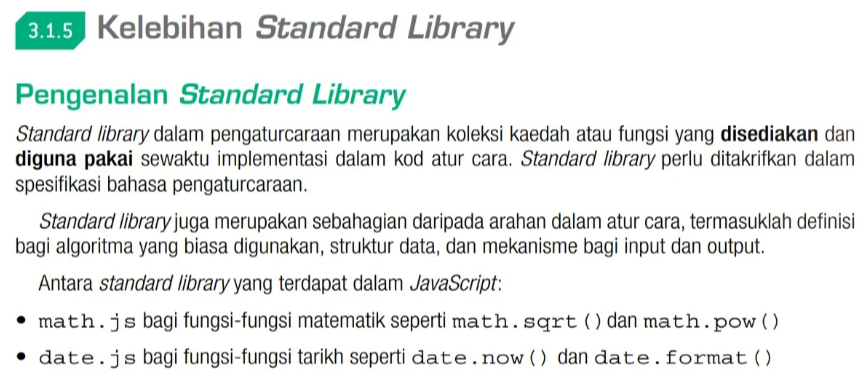
A Standard Library (Perpustakaan Standard) is a collection of built-in methods and functions supplied by the programming language specification to assist programmers in coding common operations.
- Efficiency: Saves development time by providing pre-built functions for data structures, algorithms, math operations, and input/output mechanisms.
- Common JavaScript Standard Libraries in the Textbook:
math.js: Used for mathematical formulas likemath.sqrt()(square root) andmath.pow()(exponents).date.js: Used for date tracking functions such asdate.now()and formatting.
Fungsi math.js (Mathematical Library Methods)
Jadual 3.1.30 Fungsi-fungsi dalam math.js
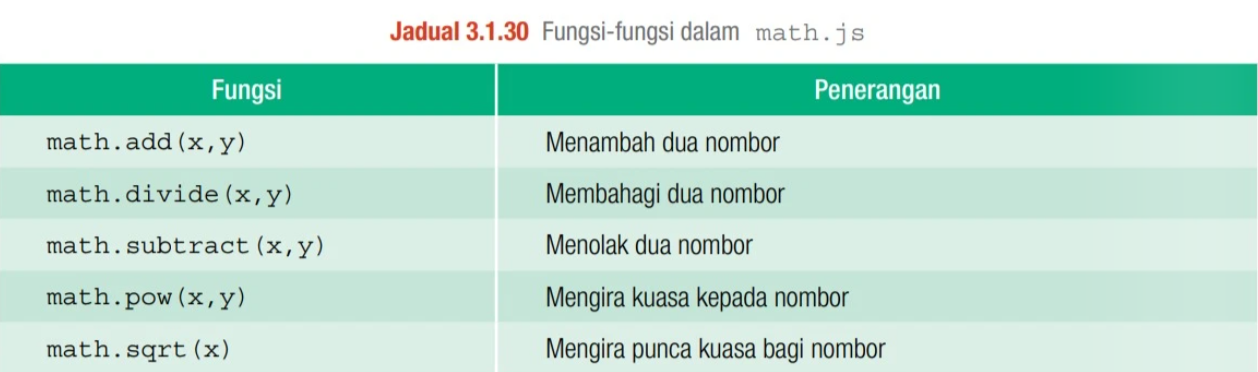
The textbook specifies five core operations within the math.js standard library that you should memorize for paper questions:
| Fungsi (Method Call) | Penerangan (English Translation) |
|---|---|
math.add(x, y) |
Menambah dua nombor (Adds two numbers) |
math.divide(x, y) |
Membahagi dua nombor (Divides x by y) |
math.subtract(x, y) |
Menolak dua nombor (Subtracts y from x) |
math.pow(x, y) |
Mengira kuasa kepada nombor (Raises x to the power of y) |
math.sqrt(x) |
Mengira punca kuasa bagi nombor (Calculates square root of x) |
Modular Programming & Sub-routines
Rajah 3.1.44 Modul Utama dan Subatur Cara
.png)
Modular programming divides a single script into smaller, isolated components. In client-side scripting, this is achieved using subatur cara (sub-routines).
- Modul Utama (Main Module): Represents the main script flow which invokes helper modular blocks.
- Sub-routine Categories:
- Prosedur (Procedure): A block of code designed to perform a task but does not return a value back to the caller.
- Fungsi (Function): Performs operations and returns a value back to the caller using a return statement.
Procedures vs Functions
Perbezaan antara Prosedur dengan Fungsi (Jadual 3.1.35)
.png)
Understanding when to use a Procedure vs a Function is a guaranteed scoring topic. Here is the formal breakdown:
| Aspek | Prosedur (Procedure) | Fungsi (Function) |
|---|---|---|
| Memulangkan Nilai | Tidak memulangkan nilai | Memulangkan nilai |
| Contoh Panggilan | toCelcius(fahrenheit); |
celcius = toCelcius(fahrenheit); |
Textbook Typo Alert: Under "Contoh definisi" for Fungsi in Jadual 3.1.35, the code has:
celcius = (5/9) * fahrenheit - 32);. Note the trailing closing parenthesis. Avoid copying this syntax typo in your theory papers; it will lead to runtime syntax errors in actual code!
Array Declaration & Manual Retrieval
Mengisytiharkan Array & Akses Satu per Satu (ms206(a))
.png)
For ms206(a), the textbook demonstrates retrieving elements one by one manually using indices to sum up numbers. You must know how arrays are declared and written in both JavaScript and Java, and understand their core differences.
// Declaring and initializing array in JavaScript
var no = [5, -1, 4, 12, 8];
var jumlah = 0;

// Adding values manually element-by-element
jumlah = no[0] + no[1] + no[2] + no[3] + no[4];

document.write(jumlah); // Outputs: 28
// Declaring and initializing array in Java (Fixed data types)
int[] no = {5, -1, 4, 12, 8};
int jumlah = 0;

// Adding values manually element-by-element
jumlah = no[0] + no[1] + no[2] + no[3] + no[4];

System.out.println(jumlah); // Outputs: 28
| Feature | JavaScript Array | Java Array |
|---|---|---|
| Type System | Dynamic typing (can hold multiple types: strings, numbers, etc.) | Static typing (must declare type e.g., int[], homogeneous elements) |
| Declaration Syntax | var no = [5, -1, 4, 12, 8]; |
int[] no = {5, -1, 4, 12, 8}; |
| Size Constraint | Dynamic size (can grow/shrink) | Fixed size (once declared, the size cannot be changed) |
Loops and Memory Blocks
Menggunakan Ulangan untuk Menjumlahkan Senarai (ms206(b))
.png)
For ms206(b), you must know how to change loops from for to while, while to for, or do-while. Additionally, you are required to know how to draw a Blok Memori (Block Memory) diagram for arrays.
Loop Conversion Playground
Select a language and loop type to view side-by-side structures:
var no = [5, -1, 4, 12, 8];
var jumlah = 0;
var i;

for (i = 0; i < 5; i++) {
  jumlah = jumlah + no[i];
}
document.write(jumlah);
var no = [5, -1, 4, 12, 8];
var jumlah = 0;
var i = 0; // Initialize control variable

while (i < 5) { // Loop condition
  jumlah = jumlah + no[i];
  i++; // Increment variable
}
document.write(jumlah);
var no = [5, -1, 4, 12, 8];
var jumlah = 0;
var i = 0; // Initialize control variable

do {
  jumlah = jumlah + no[i];
  i++; // Increment variable
} while (i < 5); // Loop condition (executes at least once)

document.write(jumlah);
int[] no = {5, -1, 4, 12, 8};
int jumlah = 0;

for (int i = 0; i < 5; i++) {
  jumlah = jumlah + no[i];
}
System.out.println(jumlah);
int[] no = {5, -1, 4, 12, 8};
int jumlah = 0;
int i = 0; // Initialize control variable

while (i < 5) { // Loop condition
  jumlah = jumlah + no[i];
  i++; // Increment variable
}
System.out.println(jumlah);
int[] no = {5, -1, 4, 12, 8};
int jumlah = 0;
int i = 0; // Initialize control variable

do {
  jumlah = jumlah + no[i];
  i++; // Increment variable
} while (i < 5); // Loop condition

System.out.println(jumlah);
Interactive Block Memory Visualizer (Blok Memori)
In SPM exams, you must draw array memory as contiguous boxes. Hover/click cell nodes to view index accesses:
Introduction to PHP & File Operations
Pengenalan PHP & Mencipta/Membuka Fail Teks (ms227)
.png)
.png)
PHP (Hypertext Preprocessor) is a skrip pelayan (server-side scripting) language — it runs on the web server, not the browser. PHP provides programming capability to process tasks and the result is returned to the browser.
Before any operation on a text file can be performed, the file must be opened first using the fopen function:
$f = fopen("nama fail teks", mod capaian);- "nama fail teks" → the nama fail (filename) you want to open, e.g.
"LogMasuk.txt" - mod capaian → the access mode that determines how the file is opened (read, write, or append — see next tip!)
- $f → a pemboleh ubah (variable) that stores the file handle for use in subsequent operations
Exam Tip: In ms227(b), know that the fopen() function takes two arguments: the filename in quotes, and the access mode. The variable $f is the PHP variable (note the $ prefix — all PHP variables start with $!) that holds a reference to the opened file.
File Access Modes — "w", "r", "a"
Mod Capaian Fail dalam fopen (ms228)
.png)
.png)
For ms228(a), the key thing to learn is the meaning of "w" in:
$f = fopen ("LogMasuk.txt", "w");
The second argument is the mod capaian (access mode). The complete list from Jadual 3.2.1:
| Mod Capaian | Meaning | Penerangan |
|---|---|---|
"r" |
Read | Fail dibuka hanya untuk dibaca sahaja (read only) |
"w" |
Write | Fail dibuka hanya untuk ditulis — starts writing from the beginning of the file (bermula dari awal fail). Overwrites existing content! |
"a" |
Append | Fail dibuka untuk ditulis — starts writing from the end of the file (bermula di akhir fail). Preserves existing content and adds new content after it. |
File Writing Code Sequence
Susunan Atur Cara — fopen, fwrite, fclose (ms229)
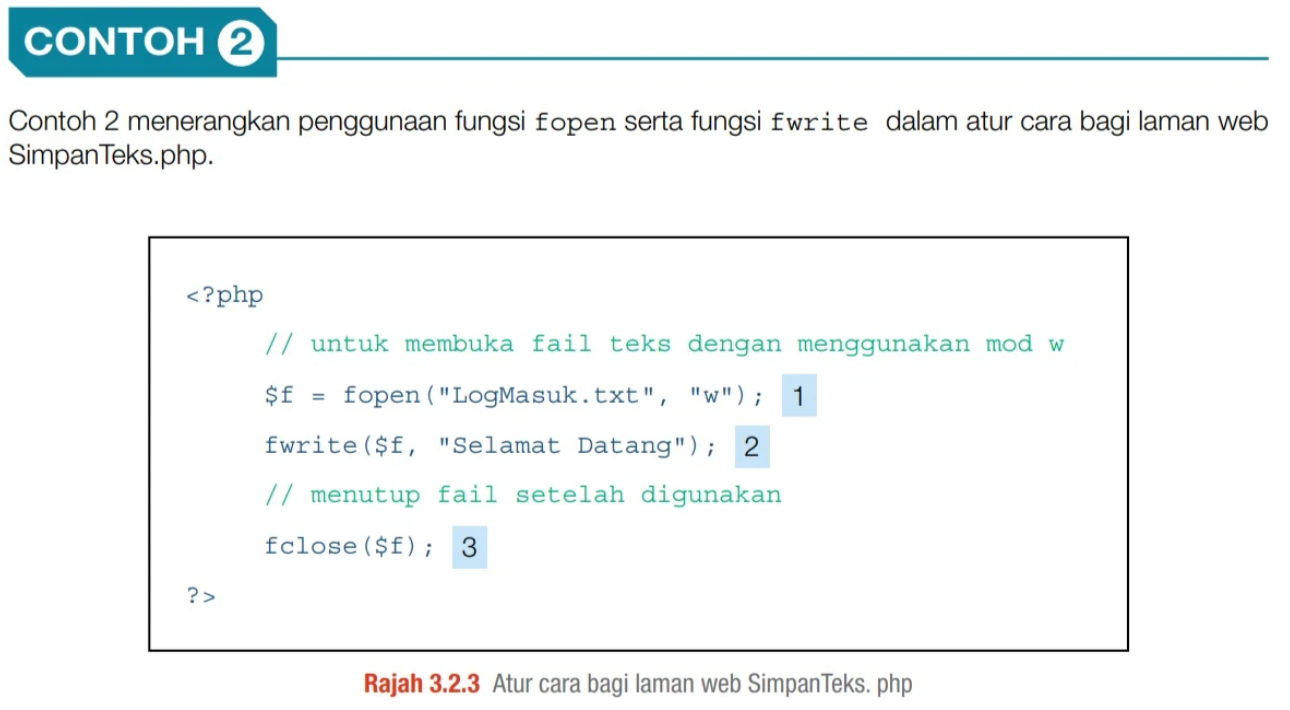
For ms229, the exam will ask you to arrange the code in the correct sequence. The three key PHP file writing functions must always appear in this order:
- ① Open:
fopen()— opens/creates the file first before anything else can be done. - ② Write:
fwrite()— writes content to the opened file using the file handle$f. - ③ Close:
fclose()— closes the file after use to free server resources.
Practice arranging the blocks below, then click Verify:
HTML Form + PHP File Logging
Atur Cara Borang & Penulisan Log ke Fail (ms231 — Rajah 3.2.6)
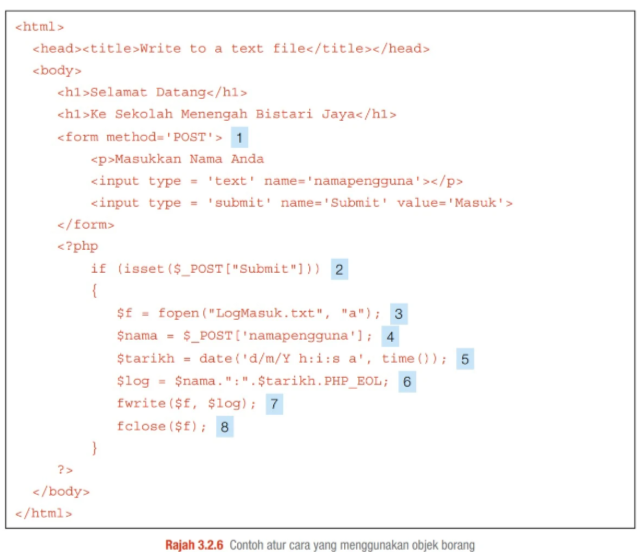
For ms231, you need to know the correct code sequence and the function of lines 7 & 8. Click each highlighted line below to inspect what it does:
Click any line on the left to see a detailed explanation of what that line of code does.
File Reading & PHP Variable Syntax
Membaca Fail & Sintaks PHP dengan Simbol $ (ms240 — Rajah 3.2.16)
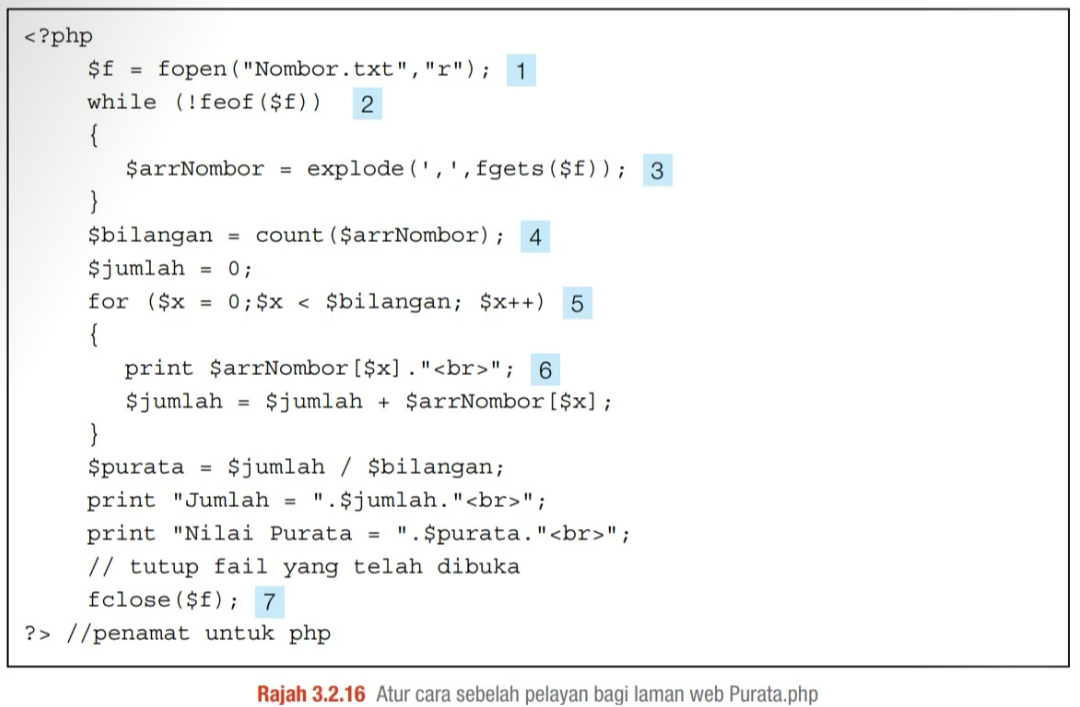
For ms240, two key exam topics:
- Tag ① — What is
"r"? The fileNombor.txtis opened in mod baca (read mode)."r"means the file is opened for reading only. No writing or appending is possible in this mode. - PHP Variable Syntax —
$prefix: In PHP, every variable must start with the dollar sign$. For example:$f,$arrNombor,$bilangan,$jumlah,$purata,$x. This is different from JavaScript (var) and Java (typed declarations).
| Tag | Code | Function |
|---|---|---|
| ① | fopen("Nombor.txt","r") | Opens file for reading. "r" = read only |
| ② | while (!feof($f)) | Loop until penghujung fail (end of file) is reached |
| ③ | explode(',', fgets($f)) | Read one line, split by comma into an array |
| ④ | count($arrNombor) | Count total elements in the array |
| ⑤ | for ($x = 0; $x < $bilangan; $x++) | Loop through each array element using $x as counter |
| ⑥ | print $arrNombor[$x]."<br>" | Display each number on a new line |
| ⑦ | fclose($f) | Close the file after reading is done |
MySQL Database Connection Functions
Fungsi Sambungan Pangkalan Data MySQL (ms244)
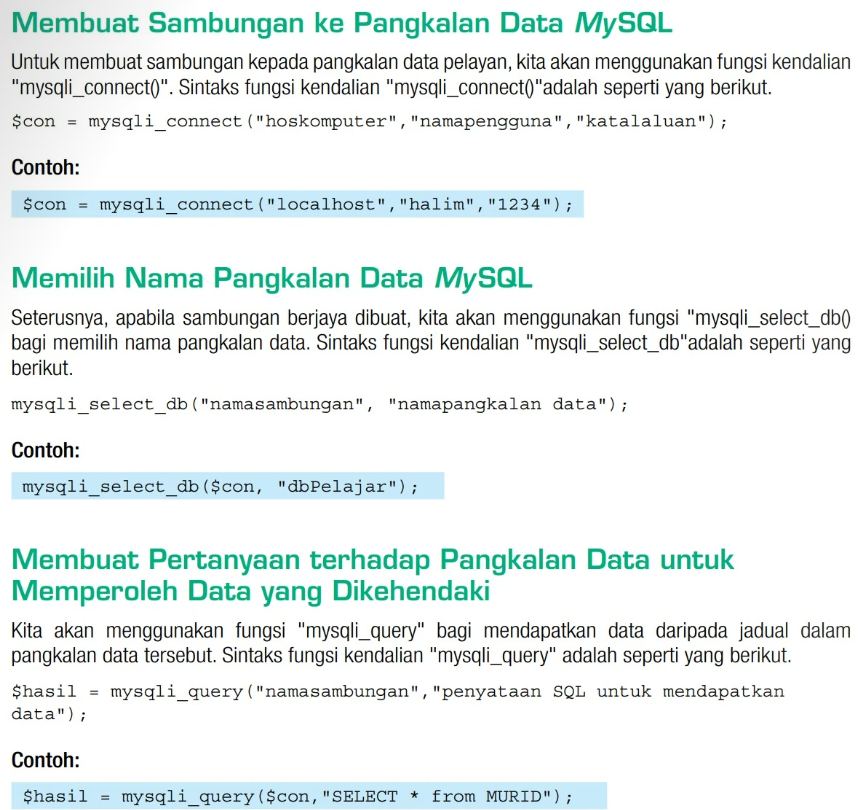
For ms244, you must know which part of each function call does what. Click each code line in the inspector to learn its parameters:
Click a line on the left to see what each parameter in the MySQL function means.
Database Query Code Sequence
Susunan Kod Pertanyaan Pangkalan Data (ms245 — Rajah 3.2.21)
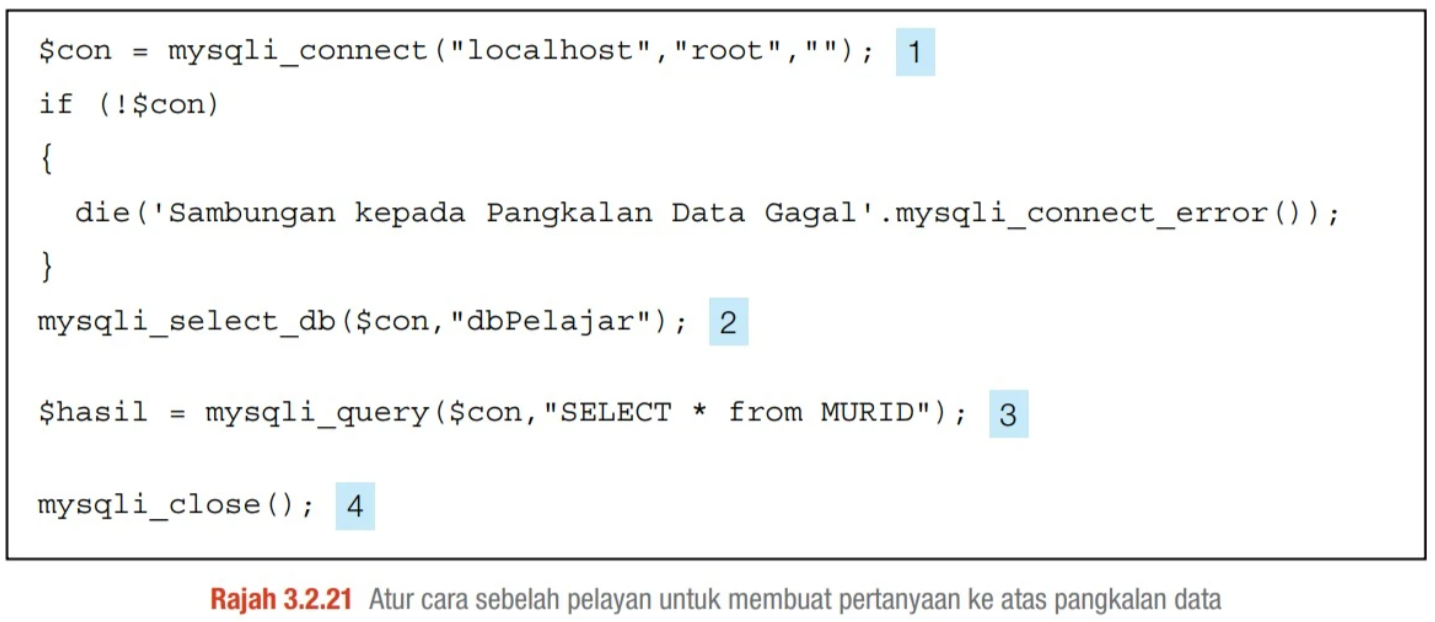
For ms245, the exam will ask you to arrange the code sequence for connecting to and querying a MySQL database. The 4 steps must always follow this order:
- ① Connect:
mysqli_connect()— establish connection to the MySQL server first. - ② Select DB:
mysqli_select_db()— choose which database to use. - ③ Query:
mysqli_query()— run the SQL query to fetch or manipulate data. - ④ Close:
mysqli_close()— close the connection to free server resources.
Practice the sequence below — use the arrows to reorder, then click Verify:
Website Design Principles
Prinsip Asas Reka Bentuk Laman Web (ms275)
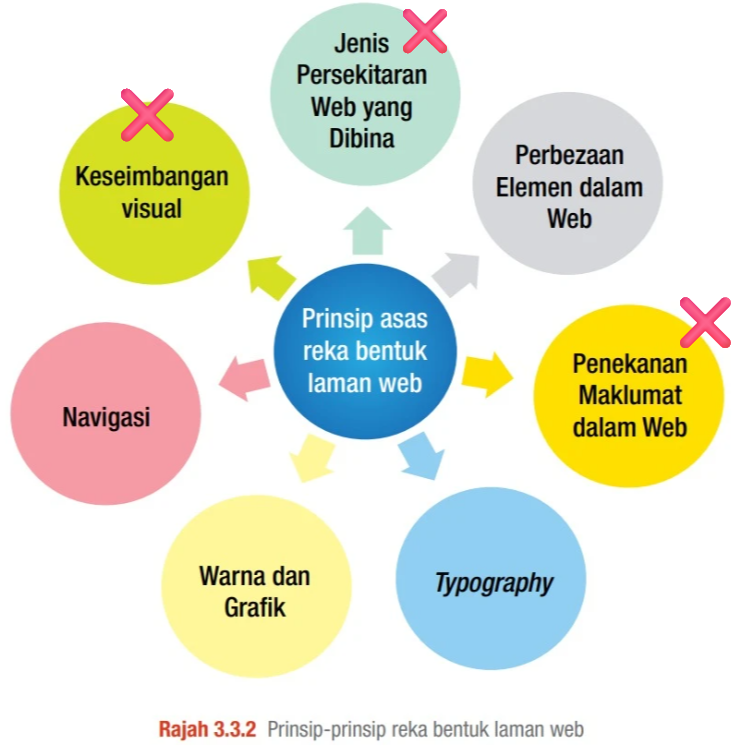
For the exam, you need to know the difference between:
- Prinsip Asas Reka Bentuk Laman Web (Basic Website Design Principles) — Focuses on page structure, typography, media, and layout elements.
- Reka Bentuk Interaksi (Interaction Design Principles) — Focuses on usability, user action feedback, consistency, predictability, and learning speed.
You must memorize the 4 design principles shown without the cross in the textbook diagram:
- Perbezaan Elemen dalam Web (Contrast): Contrast of colors, text sizes, or graphical accents to highlight key page areas and ensure clear elements visibility.
- Typography: Selection of consistent, legible, and professional fonts and sizes suited for the target audience.
- Warna dan Grafik (Colors and Graphics): Aesthetic and strategic color palette/media layout to convey branding, mood, and improve reading comfort.
- Navigasi (Navigation): Intuitive pathways, buttons, and links that guide users through pages smoothly without getting lost.
Website Navigation Identification
Identifikasi Elemen Navigasi Laman Web (ms281)
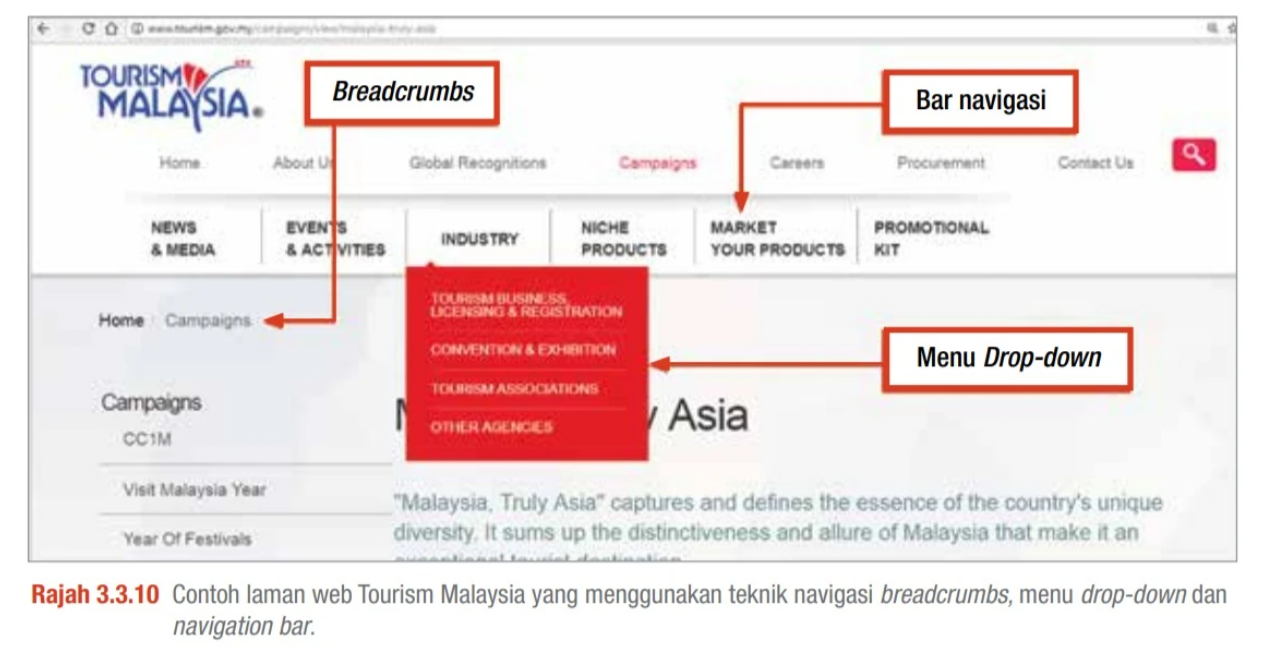
In theory papers, you may be asked to **fill in the blanks** to identify navigation components on a website screenshot. Be ready to match these 3 elements:
- Breadcrumbs: A navigational path (e.g. *Home > Campaigns*) showing users their exact current subpage location relative to the home page.
- Bar navigasi (Navigation Bar): A horizontal row (or vertical list) containing links to the main categories of the website.
- Menu Drop-down: A vertical container listing sub-options that expand when hovering or clicking a navigation bar link.
Navigation Techniques
Teknik Navigasi Laman Web (ms288 & ms289)
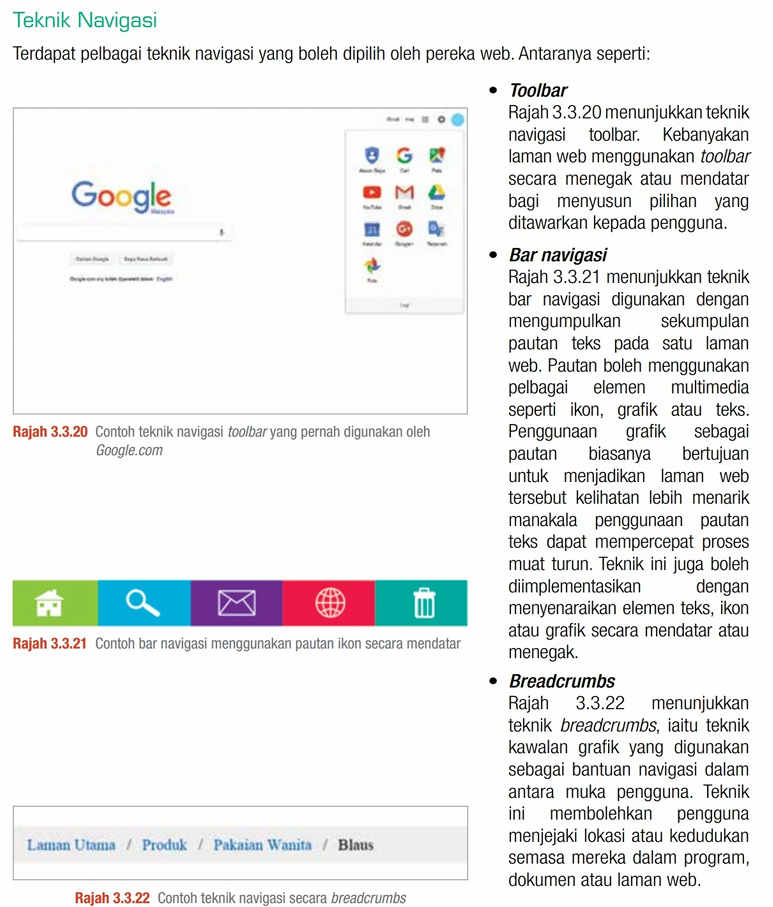
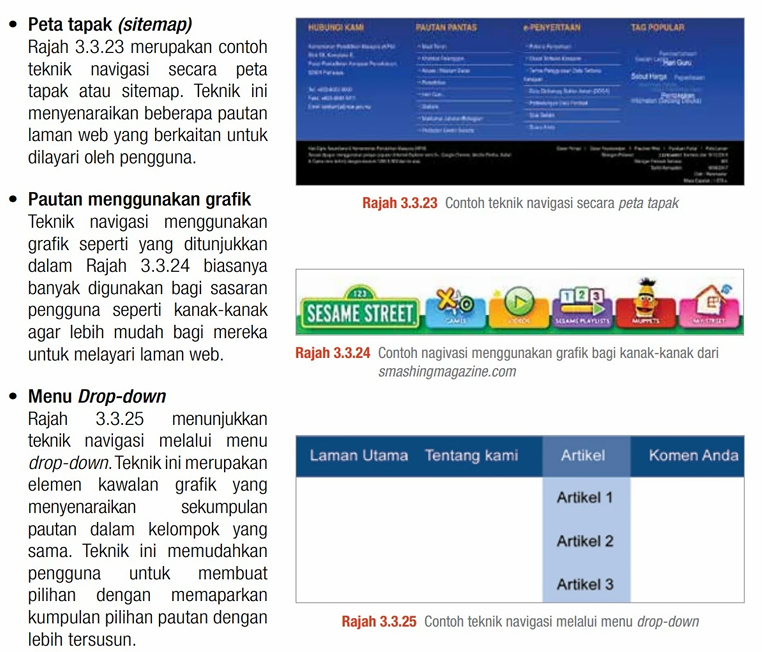
EXAM WARNING: If the question asks for a Teknik Navigasi (navigation technique), DO NOT write "toolbar" as your answer. Instead, write Bar navigasi (or navigation bar) or Breadcrumbs to ensure full marks!
For the exam, you need to recognize and describe these 6 navigation techniques from textbook figures (Rajah 3.3.20 to Rajah 3.3.25):
- Toolbar: Arranges options vertically or horizontally (e.g. Google product grid menu). Avoid using this as a primary answer for navigation techniques in the exam.
- Bar navigasi (Navigation Bar): Groups a set of text links, icons, or graphics horizontally or vertically to direct users to main pages.
- Breadcrumbs: A text-based trail (e.g. Home / Products / Clothing) that allows users to track their current position within the site hierarchy.
- Peta tapak (Sitemap): Lists all main subpages and sections grouped logically (typically placed in the footer area) to provide a complete directory of the site.
- Pautan menggunakan grafik (Graphical Links): Uses prominent images or custom graphical icons. Recommended for children's websites to make navigation highly intuitive.
- Menu Drop-down: Organizes lists of related links under single menu categories that unfold when clicked or hovered over, keeping layouts tidy.
Definition of HTML
Apakah HTML? (ms291)
For the exam, you must memorize the exact textbook definition of HTML:
English Explanation: HTML is not a programming language but a markup language. It provides the structured skeleton (headings, tables, forms, anchors) that web browsers parse and compile to render visual elements on a web page.
HTML Page Structure
Struktur Asas Halaman HTML (ms292 — Rajah 3.3.28 & 3.3.29)
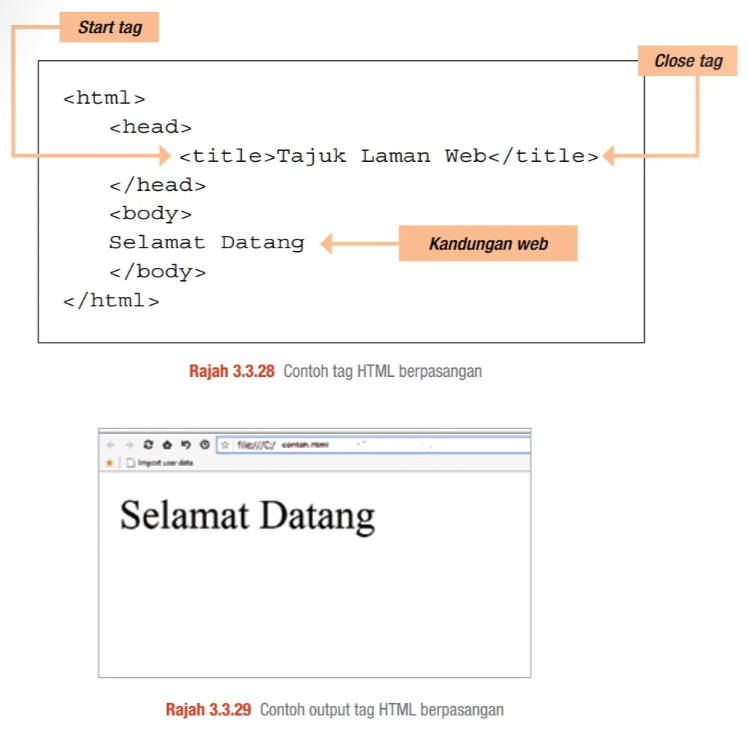
The exam may show a web page output and ask you to write the full HTML code that produces it. You must know the paired HTML tag structure by heart:
- <html> ... </html>: The root container wrapping all page content (Start tag and Close tag).
- <head> ... </head>: Holds metadata such as the page tajuk (title).
- <title> ... </title>: The text shown on the browser tab.
- <body> ... </body>: All visible kandungan web (web content) goes here.
Headings & the <header> Element
Elemen Heading & Header dalam HTML (ms293 — Rajah 3.3.30–3.3.32)
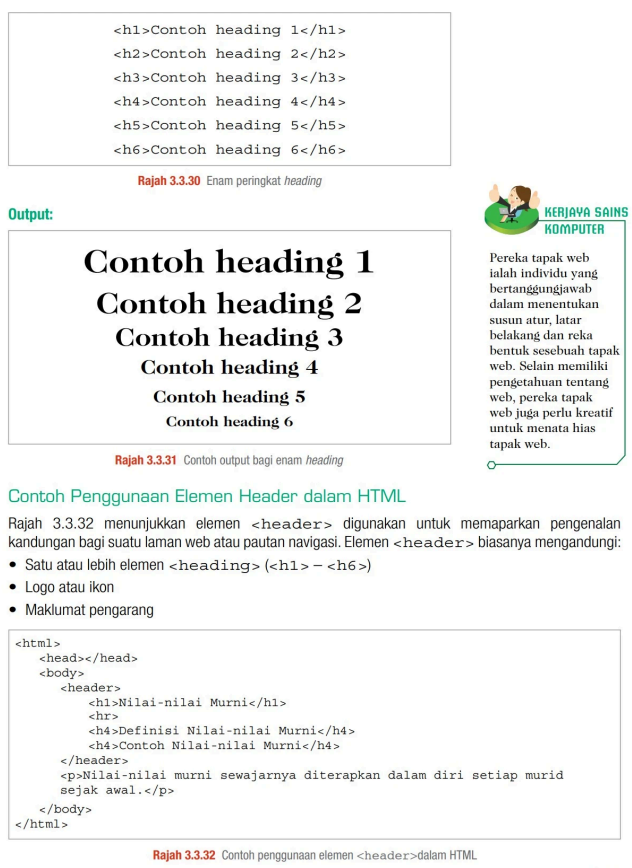
Upper part — Heading levels: HTML has 6 heading levels. <h1> is the largest; <h6> is the smallest. The exam may show the visual output and ask you to write the tag:
| Tag | Output Size |
|---|---|
<h1>...</h1> | Largest (biggest, boldest) |
<h2>...</h2> | Second largest |
<h3>...</h3> | Third level |
<h4>...</h4> | Fourth level |
<h5>...</h5> | Fifth level |
<h6>...</h6> | Smallest |
Lower part — <header> element: The <header> tag groups introductory navigation content. It typically contains heading tags, a logo, or author information. Exam may ask you to write the full <header> block:
<p>, <br> & <img> Elements
Perenggan, Baris Baharu & Imej dalam HTML (ms294 & ms295)
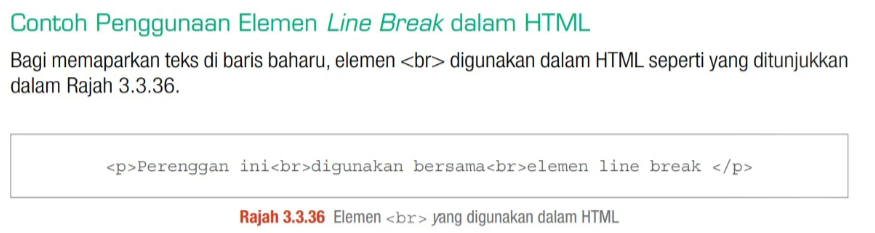
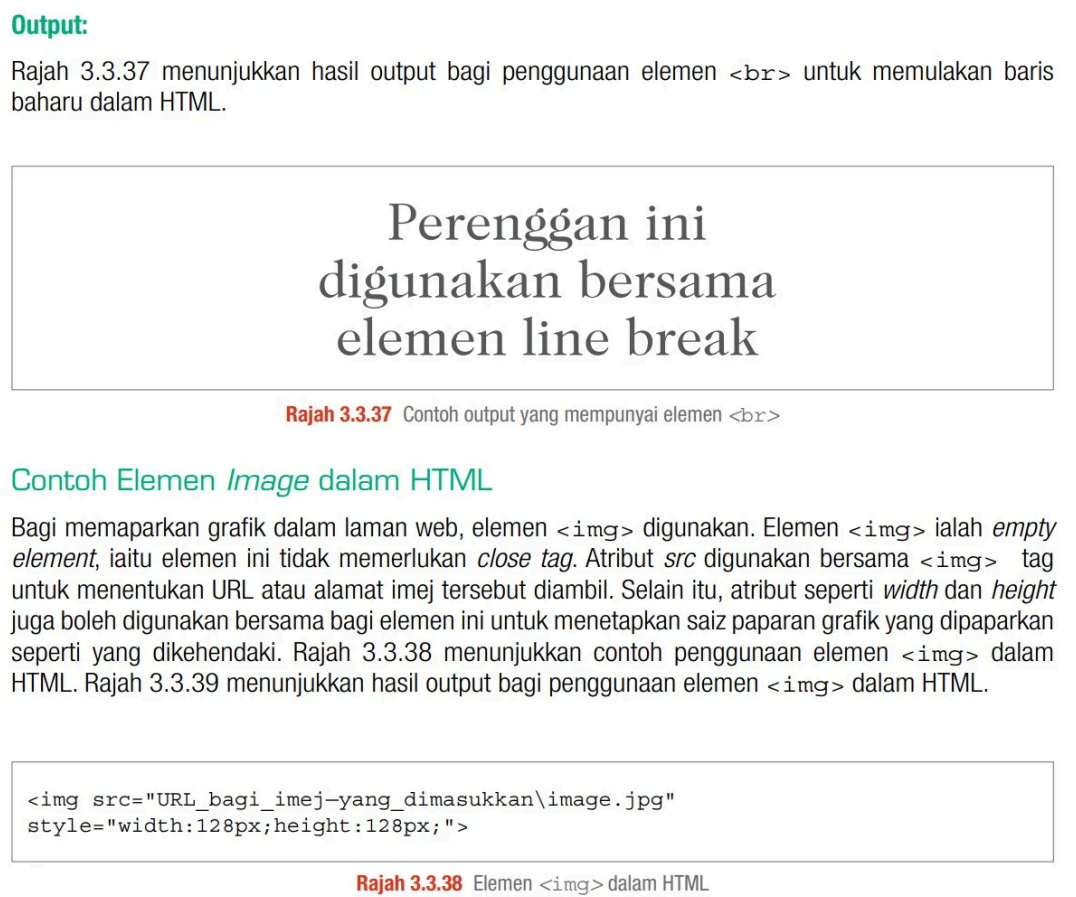
<p> — Paragraph tag: Wraps a block of text as a paragraph. Always paired with a close tag.
<br> — Line Break tag: Forces a new line inside a paragraph. This is an empty element — it does NOT have a close tag. Place it inside a <p> tag:
<img> — Image element: Also an empty element (no close tag). This is confirmed in SPM trial. The exam may give you a width and height and ask you to write the full tag:
src: The file path or URL of the image to display.style="width:...px;height:...px;": Sets display size using inline CSS. The exam will give you the values.
Internal CSS — <style> Tag
CSS Dalaman menggunakan Tag <style> (ms299)
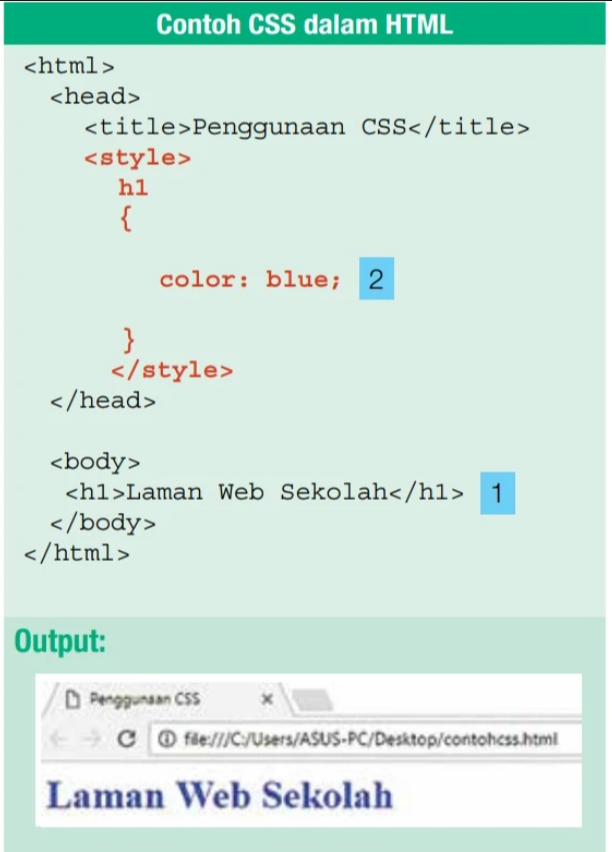
Internal CSS is written inside a <style> block placed in the <head> section. No separate CSS file is needed — the styles apply directly to the current HTML page:
CRITICAL SPELLING RULES:
- Write color — NOT
colour. CSS uses American English spelling. - Write text-align: center — NOT
centre. Same reason.
Inline CSS — style Attribute
CSS Sebaris menggunakan Atribut style (ms302)
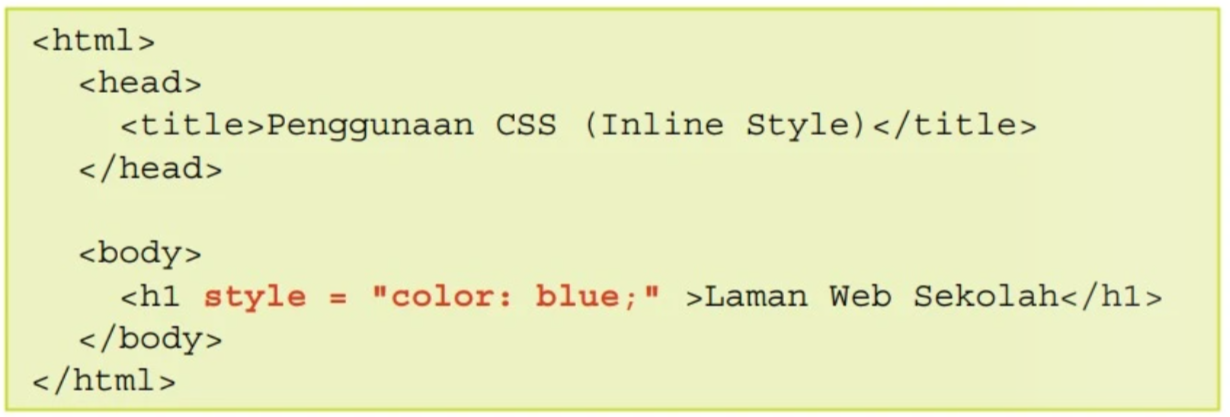
Inline CSS is written directly inside an HTML tag using the style attribute. The CSS declaration is placed inside double quotes, right on the element you want to style:
- The
styleattribute goes inside the opening tag before the>. - The CSS property and value are written as
property: value;inside double quotes. - No
<style>block or external file needed — the style applies only to that specific element.
CSS Syntax Rules
Sintaks CSS — Titik Bertindih & Koma Bertitik (ms303)
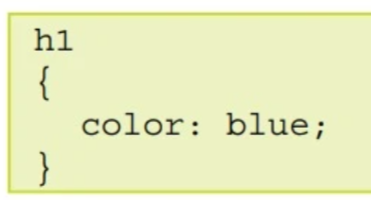
The exam may ask you to fill in the CSS syntax. You must know exactly where the colon and semicolon go:
{
color: blue;
}
- Colon
:separates the CSS property name from its value. - Semicolon
;ends each CSS declaration.
EXAM WARNING: The semicolon ; must be the standard English ASCII semicolon. Do NOT use the Chinese/full-width semicolon ; (which has bolder, wider dots). Wrong punctuation = wrong answer!
CSS Text Align
Harta CSS text-align (ms304)
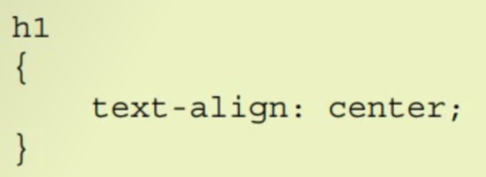
The text-align property controls horizontal text alignment. You must write center alignment precisely as shown:
CONFIRMED SPM TRIAL TOPIC: Writing text-align code is highly likely to appear in your SPM trial. Memorize the syntax structure carefully!
SPELLING REMINDER: Always use the US spelling center. If you write the British/Malay spelling centre, the browser will ignore the rule and you will lose marks!
CSS Font Family
Harta CSS font-family (ms306)

The font-family property sets the jenis huruf (typeface) of text. You do not need to memorize font names — the exam will provide them. You just need to write the correct syntax:
- Font names containing a space must be wrapped in double quotes:
"Arial Black". - Single-word fonts can be written without quotes:
Arial.
CSS Font Size
Harta CSS font-size (ms307)
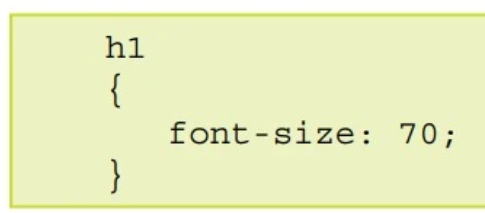
The font-size property sets the saiz teks (text size). Syntax from the textbook:
Textbook Note: The textbook writes font-size: 70; without a unit. In practice, standard CSS requires a unit like px (e.g. font-size: 70px;). However, follow the textbook format for SPM exam answers to match the mark scheme.
CSS Font Style
Harta CSS font-style (ms308)
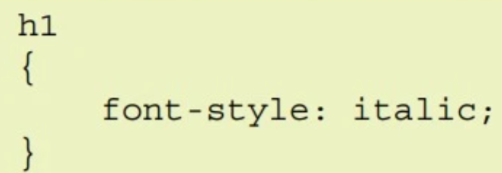
The font-style property controls the slant of text. The exam will show an image with styled text and ask you to write the CSS. You must memorize the keyword value for italic slant:
- italic: Slants the text characters to the right. This is the primary value you need to know for the exam.
CSS Background Color
Harta CSS background-color (ms309)
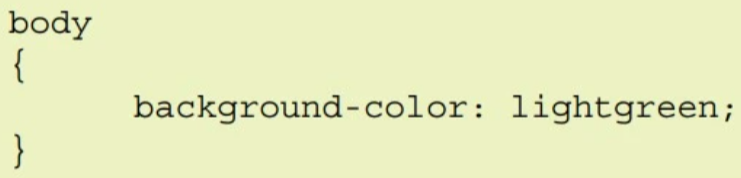
The background-color property sets the warna latar belakang (background color) of an element. Applied to body to color the entire page:
- Can use named colors:
red,blue,lightgreen,yellow, etc. - Can also use hex codes:
#ff0000, or RGB:rgb(255,0,0). - Remember: color (no ‘u’) — the same American English spelling rule applies here.
CSS Background Image
Harta CSS background-image (ms311)

The background-image property sets an image as the latar belakang (background) of an element. The exam may provide the image file path and ask you to write the full CSS declaration:
- The file path goes inside
url("...")— note the double quotes inside the parentheses. - The exam will provide the path (e.g.
D:/web/gambar.jpg). You only need to place it correctly insideurl("..."). - This is different from
background-color— you need theurl()wrapper for images.
Feedback & Queries
Submit form questions or overall website feedback